Thursday, June 9, 2016

Finance Extraction

General Info
All accounting documents are present in BKPF/BSEG.
The Invoice documents are present in RBKP/RSEG
When there is a tax amount entered against an document, those entries are added in BSET.

BKPF is the header table and BSEG is the item level table (?). It is a cluster table which has data from tables BSIK,BSAK, BSIS,BSAD, BSIS,BSAS.


Difference between BELNR and DOCNR
  • BELNR : Document Number / BUZIE  Line Item
  • DOCNR : Account Document Number / DOCLN Line Item ( General ledger View )
BELNR can be found in the FI base tables : BKPF and BSEG. It the key field in finance. DOCNR is present in FAGLFLEXA table ( General Ledger: Actual Line Items ) where DOCNR is the key field. This table also has BELNR and  BUZEI ( Line Item) in the feilds. Each line item BUZIE for a BELNR can have multiple DOCLNs.
The value in the fields of BELNR and DOCNR is the same. Just the item level details are changing as DOCNR/DOCLN gives you more line level detail.
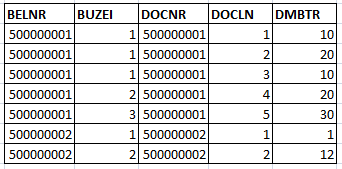
In the FAGLFLEXA, we can find the GL related postings and in the above example, the total amount for line item 1 would be 30, when seen in BSEG table.

The t-code for checking this is FB03 -> Display -> <Entry View> will give the regular item details and when <General Ledger View> is set, it will give you further details view which are the DOCLNs.

When using datasource 0FI_GL_14, this has both BELNR/BUZEI and DOCNR/DOCLN and in general, DOCNR is mapped to 0AC_DOC_NR/AC_DOC_LN and BELNR/BUZEI to AC_DOC_NO/ITEM_NO.


Useful Links : 
Asset Accounting Delta

BWOM_SETTING for datasources

Financial Account and Asset datasources 


Monday, April 18, 2016

ECC BW Misc

Safety Intervals
Safety limits are used to subtract the time intervals of the data pointers. Safety intervals subtracts the data from the limit values. If current pointer is 1000 and there are 500 more records in delta and each time there will be 500 delta records.

Lower Limit

If we add lower limit 100 , first run, we get data from 901 – 1500 instead of 1001-1500 first time, then again for the next time we get 1401 – 2000 instead of 15001 – 2000. There will be always repition of data. Here 901 to 1000 and also 1401-1500 are extracted twice.
-          So whenever lower limit is set, we should always load to DSO first and then to Infocube. Bcos of duplicates.

Upper Limit

If upper limit 100, we get records 1001 – 1400 instead of 1001-1500 and then, 14001 – 1900 instead of 1500 – 2000.
-          We do not get any duplicate records but we will have lag in records.
Scenario
For say, a transaction take 2 minutes to get posted, and the transaction was created at 1:00 PM and the delta runs at 1:01. Technically it should pick the transaction values in delta. But as we said, it takes 2 minutes to post the entry to the table, so it transaction value will only appear in the table at 1:02 – hence not appearing in the delta which ran at 1:01. So if we put upper limit at 2 minutes, at 1:01 it will fetch delta till 12:59 and in the mean time 1:02 will be posted to the next delta.

Deltas methods are ‘Additive Delta’ and ‘New Status for changed Records’ which is After Image..

Wednesday, April 6, 2016

Finance Datasources

Finance Datasources


Finance Extraction depends on BWOM_SETTING table settings. More information can be found in the following link
https://blogs.sap.com/2013/04/02/bwomsettings-for-fi-loads-in-sap-bi/


0FI_GL_14 - General Ledger (New): Line Items Leading Ledger

0FI_AP_4 - Vendors: Line Items with Delta Extrcation

0FI_AR_4 - Customers: Line Items with Delta Extraction

0FI_AP_51 - Check Register: Line Items

Checking if an Accounting Document is cleared or not
Give the accounting document, company code and year in BSEG..And check for the customer line item in BSEG koart eq 'D' and if augbl is initial..If it is initial then the accounting document is not cleared

Monday, March 7, 2016

OTC

Purchase Requisition
A requisition order is a form that a department must submit to whichever department controls the financial activities of the business. Although individual forms vary by business, requisition orders generally require certain information, including the department requesting materials, the exact number of supplies requested, a general description of those supplies, the legal name of the supplier and the expected price of the purchase. A requisition order is either approved or denied by the financial department of the business.


Purchase Requisition to Purchase Order
Purchase Order

Once the financial office of a business has approved the requisition order submitted by a department, it issues a purchase order to the supplier of the requested goods. Purchase orders should include certain information, such as the name of the purchasing office, supplies being purchased, ship-to address, payment terms, invoicing instructions and purchase order number. To assist in record keeping, purchase orders will have the same number as the requisition order that generated them.

Account Assignment
Some Purchase Orders can have Account Assignment. They are assigned to give information on who to bill internally. Some examples are
If a PO is assigned Cost Center under Account assignment, then for that PO Cost center is billed(?)
If a PO is assigned Sales Document , that means , the PO was created to satisfy a Sales Order. This is valid in the case, where a company buys some items from 3rd Party vendors and then sells them to their clients.

EKKN table has all POs which are have Account Assignments. If a PO is not present in this table, then is not assigned anything.
TCode : ME2L

Extra notes on Account Assignment https://wiki.scn.sap.com/wiki/display/ERPSCM/Account+assignment+in+purchasing+document


ORDET TO CASH

This is the integration of SD and FI.
https://toughnickel.com/business/SAP-Order-To-Cash-SAP-OTC