Wednesday, July 13, 2016

IDocs and TRfc

Idocs  and TRfc


IDoc
Intermadiate Document
An IDoc (intermediate document) is a standard data structure for electronic data interchange (EDI).
IDocs are used for the data interchange between SAP systems as well as between an SAP system
and an external system. IDocs serve as the vehicle for data transfer in SAP’s Application Link
Enabling (ALE) system. The contents, structure, sender, receiver, and current status of the IDoc are
defined in the IDoc header.

Data extraction from an SAP R/3 source system to BW begins when BW sends a request in the form of a request IDoc.
The source system then extracts the data and sends it to the BW system.

REFER LINK

Transactional RFC (tRFC)
For each transaction running in the system, there will be LUWs generated. These can be seen in SM58.


Scenarios
Data not coming to BW - Request is in Yellow status
This might happen, when the TRfc are struck in the source system .

Take the IDoc number and go to Tcode - WE02 and display the Idoc to see if there are any errors.

Also, go to SM58 and run the tcode. It will give you list of TRfc present in the system. They can either be due to some errors or just hanging there as there are no processors to process them. You can execute these from here , so that they reach the destination.

Maintaining Languages
Tcode : WE03
In the infopackage, we can see the incoming and outgoing idoc numbers and if we run WE03, we can see the logs of the request.
In language infopackages, even though we cannot see the SPRAS selection, if we check the iDoc, we can see the languages being used in the filter


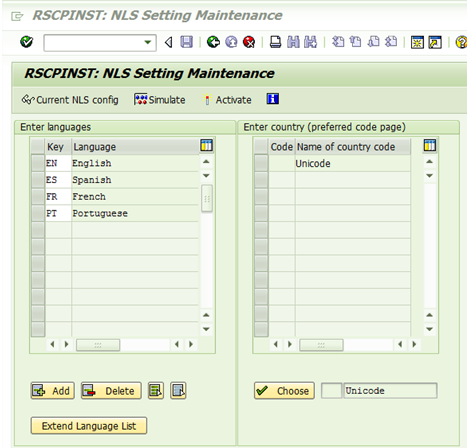
Language setting in BW

Master T-code for Language settings
I18N

TCodes : I18N ; SMLT ; RZ10 ; RZ11

Table : TCPOI


Report Program : RSCPINST

This is the ‘NLS Setting Maintainance’ program, where we can add new languages to the system.


Click on ‘Add’ and add the languages.
Sometimes, the F4 help would not give the language you intend to add. In that case, the language list needs to be extended using ‘Extend Language List’ where it takes to a new screen and new language can be added.


 SMLT Tcode

Once that step is done, you can see the new language in the F4 help and add it. Save and activate it, and the system would update all the database table entries with the new language setting. Then the paramtere ‘zca/installed_languages’ needs to be maintained manually.

RZ10
This is where profiles for the system are maintained. Each profile has number of parameters to be maintained.
For adding language the parameter would be ‘zca/installed_languages’. System needs to be restarted once the change is done.


Corresponding SAP Notes

112065 - Using customer language 'Z1'
42305 - RSCPINST (I18N configuration tool)
2185213 - Configuration of logon languages and profile parameter zcsa/installed_languages
1345121 - Profile Parameters which should not be set in Unicode
529789 - BW extraction/extractor checker differences ( Point 10)
73606 - Supported Languages and Code Pages


Billing

Datasources
  • 2LIS_13_VDHDR
  • 2LIS_13_VDITM
  • 2LIS_13_VDKON
TCode
VF01 / VF02  / VF03

Base Tables 
VBRK ( Billing Document: Header Data )
VBRP ( Billing Document: Item Data)
VBUK 
VBUP
KOMV / KONV [ KOMV is only a strucutre ]

Bill Plan Header  : FPLA
Bill Plan Item      : FPLT 


Set up tables
OLI9BW / RMCVNEUF
Can be run open with out any selection. Has Billing document on the selection screen

Related SAP Notes
SIS/BW: Statistics update for value items, quantities HERE

Creating Billing Document / Change to Bill Plan
Here you can create billing documents for a sales order ( I am doing this for bill plan related stuff )
Go to VF04 - Enter sales document and billing date.
check order type check box in the end.
it will display an entry
save it
this will create a billing document.


2LIS_13_VDITM

Billing Item
Base tables : SAP Link

FKIMG and ZFKIMG / OLIME / NETWR and ZZNETWR
My Notes* ( not sure if below is the right explanation )
In VBRP, we can see FKIMG populated irrespective of POSAR, but in 2LIS_13_VDITM, FKIMG does not get populated for Value Items. SAP Note 368011 will solve the issue.

Basically, for value item OLIME is the field which is populated. This field is not from any table, but a structure which gets populated internally ( not sure where ).
So if you implement Note - solution 2  values from OLIME or FKIMG are moved to ZFKIMG which can be used in BW.

Check code in below function module to see the assignment
EXIT_SAPLMCS6_002
ZXMCVU06


2LIS_13_VDKON

Base table : VBRK
                    VBRP
                    KONV ( In LBWE structure it is KOMV, but KOMV is only a structure)

This datasource works as Item change date as pointer. It will get all new/changed records at item level.

Only Active conditions are considered. KONV-KINAK should be blank.
If Note 1062462 is implemented, Inactive conditions can be extracted, but there are some other other side effects as mentioned in the note - Not sure how they would effect.
Personal experience : In the user exit for the extractor, I added code to add Inactive records to the standard extractor.


BW House Keeping


  • Delete entries from PSA regularly
  • Delete entries from change log regularly
  • Use RSREQREDUCE tcode to monitor the growth of infoproviders

Thursday, June 9, 2016

Finance Extraction

General Info
All accounting documents are present in BKPF/BSEG.
The Invoice documents are present in RBKP/RSEG
When there is a tax amount entered against an document, those entries are added in BSET.

BKPF is the header table and BSEG is the item level table (?). It is a cluster table which has data from tables BSIK,BSAK, BSIS,BSAD, BSIS,BSAS.


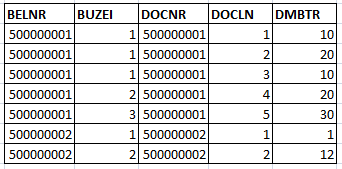
Difference between BELNR and DOCNR
  • BELNR : Document Number / BUZIE  Line Item
  • DOCNR : Account Document Number / DOCLN Line Item ( General ledger View )
BELNR can be found in the FI base tables : BKPF and BSEG. It the key field in finance. DOCNR is present in FAGLFLEXA table ( General Ledger: Actual Line Items ) where DOCNR is the key field. This table also has BELNR and  BUZEI ( Line Item) in the feilds. Each line item BUZIE for a BELNR can have multiple DOCLNs.
The value in the fields of BELNR and DOCNR is the same. Just the item level details are changing as DOCNR/DOCLN gives you more line level detail.
In the FAGLFLEXA, we can find the GL related postings and in the above example, the total amount for line item 1 would be 30, when seen in BSEG table.

The t-code for checking this is FB03 -> Display -> <Entry View> will give the regular item details and when <General Ledger View> is set, it will give you further details view which are the DOCLNs.

When using datasource 0FI_GL_14, this has both BELNR/BUZEI and DOCNR/DOCLN and in general, DOCNR is mapped to 0AC_DOC_NR/AC_DOC_LN and BELNR/BUZEI to AC_DOC_NO/ITEM_NO.


Useful Links : 
Asset Accounting Delta

BWOM_SETTING for datasources

Financial Account and Asset datasources